Showing posts with label fighting for a better world. Show all posts

Friday, June 03, 2011

From Slides to Silicon in 3 years!


Remember our Xen 0wning Trilogy at Black Hat in summer 2008, specifically the presentation on Detecting & Preventing the Xen Hypervisor Subversions?

One of the things we were discussing there was a proposal to include an additional restriction to Intel processors that would disallow execution of usermode pages from within supervisor mode (ring0). Such a feature, we argued, apart from obviously making many ring3-to-ring0 exploits much harder, including the very Xen heap overflow exploit we presented in the slides, would also bring us closer to efficient runtime code integrity checkers for kernels and hypervisors, as discussed in the slides.


Slide #97, Detecting and Preventing Xen Hypervisor Subversions, Black Hat USA, July, 2008

Fast forward 3 years. On June 1st, 2011, an Intel engineer is submitting a patch for Xen to support a mysterious new processor feature called SMEP (Supervisor Mode Execution Protection). He writes the feature is not yet documented in SDM, but soon will be. In fact, the May 2011 update of Intel SDM already contains the details:

Intel SDM, vol. 3a, May 2011, source: intel.com

Some other people spotted this feature earlier, because of another patch submitted by another Intel engineer to Linux kernel a few weeks ago. Here's a good write up by Dan Rosenberg discussing how this patch makes writing Linux kernel exploits harder, and how it's still possible to write them.

The SMEP feature still doesn't seem to be present in the processors available on the market, including the latest Sand Bridge processors, but there's no question it's coming, now that the feature made it into SDM.

It is quite rewarding to see your idea implemented in a processor... I guess this is how physicists feel when they introduce a new particle as part of a new quantum model, and later discover evidences to support the existence of this very particle in the wild...

Saturday, May 28, 2011

(Un)Trusting the Cloud


Everybody loves The Cloud these days, and it is not hard to understand why. When every person owns computers (devices), the cloud is really hard to beat when it comes to syncing all your digital life back and forth between all those devices, and also sharing with your family members, friends, and colleagues at work. From task lists, through calendars, through health & fitness data, to work-related documents. And I'm not even mentioning all the unencrypted email that is out there.

One doesn't need to be especially smart or security conscious to realize how much this might be a threat to security and privacy. How much easier would it be to attack somebody's laptop if I knew precisely in which hotel and when he or she is planning to stay? How much more expensive would my health and life insurance be, if they could get a look at my health and fitness progress? Etc.

But we're willing to sacrifice our privacy and security in exchange for easy of syncing and sharing of our data. We decide to trust The Cloud. What specifically does that mean?

First, it means we trust the particular cloud-based service vendor, such as the provides of our training monitoring app and service. We trust that this vendor is: 1) non-malicious and ethical, and so is not going to sell our private data to some other entity, e.g. insurance company, and 2) that the software written by this vendor is somehow secure, so it would not be easy for an attacker to break into their cloud service and download all the user's data (and then sell to health insurance companies).

Next, we trust the cloud infrastructure provider, such as Amazon EC2. We trust that the cloud provider is 1) non-malicious and ethical, and that they won't really read the memory of the virtual machine on which the previously mentioned cloud-service is running (and won't make it available to a local government officials, e.g. in China), and 2) that they secured their infrastructure properly (e.g. it wouldn't be easy for one customer to “escape” from a VM and read all the memory of the VMs belonging to other customers).

Finally we trust all the infrastructure that is in the middle between us and the service provider, such as e.g. the networking protocols, are safe to use (e.g. we trust all the engineers working in any of the ISP we use won't sniff/spoof our communication, e.g. by using some fake or quasi-fake SSL certs).

So, that's a hell of a lot of trusting! And the stake is high. Do we really need to make such a sacrifice? Do we really need to hand in all our private data to all those organizations? Of course we don't!

First, notice that in majority of cases, the cloud is only used basically as a on-line storage. No processing, just dump storage. Indeed, what kind of server-side processing does your task list or calender require? Or your freestyle swimming results? Or your conference slides? None.

And we know for very long how to safely keep secrets on untrusted storage, don't we? This is achieved via encryption (and digital signatures for integrity/authenticity). So, the idea is very simple: let's encrypt all the data before we send them to the cloud. The point here is, the encryption must be done by the app that is running on our client device. Not in the cloud, of course.

Ok, so let's say I have my calendar records encrypted in the cloud, how do I share it with my other devices and other people, such as my partner and colleagues at work? Very simple – you encrypt each record with a random symmetric key and then, for every other device or person who you want to grant access to your calendar you make the symmetric key available to this person, by encrypting it with their public key (if you're paranoid, you can even verify fingerprints using some out-band communication channel, such as phone, to ensure the cloud/service provider didn't do MITM attack on you). What if you want to share only some events (or some details) with some group of people (e.g. only your availability info)? Very simple – just encrypt those records you want to share in non-full access with some other symmetric key and publish only this key to those people/devices you want to grant such non-full access.

Implementing the above would require writing new end-user apps, or plugins for existing apps (such as Outlook), so that they do encryption/decryption/signing/verification before sending the data out to the cloud. But what stops the malicious vendor from offering apps that would be leaking out our secrets, e.g. the keys? Well, nothing actually. But this time, the vendor would need to explicitly build in some kind of backdoor into the app. The same could be done with any other vendor, and any other, non-cloud-based app. After all, how do we know that MS Word, which is not cloud-based yet, is not sending out fragments of our texts to Agent Smith? Note how different this is from a situation when the vendor already owns all our data, unencrypted, brought legitimately to their servers, and all they need to do is to read them from their own disks. No need to plant and distribute any backdoors!

In practice few vendors would be risking their reputation and would be willing to build in a backdoor into an app that is then made available to customers. Because every backdoor in such client-exposed code will sooner or later be found (You would really not believe what great lengths all those young people aimed with disassembler and debugger would go to, to win an economy class ticket to the middle of desert in the hottest summer season, just to be able to deliver a presentation on how evil/stupid a company X is ;).

One problem is, however, with accessing our encrypted cloud over a Web Browser. In contrast to apps, the web browser content is much less identifiable. An app can have a digital signature – everybody know its an App v 1.1, published by X. As explained above it would be rather stupid for X to plant a backdoor into such an app. But a Web-delivered Javascript is much more tentative, and it's very possible for X to e.g. deliver various versions of scripts to different customers. Digital signature on client-side scripts, paired with ability to whitelist allowed client-side-scripts, would likely solve this problem.

So, why we still haven't got client-side-encrypted cloud-services? The question is rhetorical, of course. Most vendors actually loves the idea of having unlimited access to their customers data. Do you think Google would be happy to give up an opportunity to data mine all your data? This might affect their ad business, health research, or just Secret Plan To 0wn The World. After our dead body, I can almost hear them yelling! After all they have just came up with Chrome OS to bring even more data into their data mining machine...

To sum it up, there is no technical reason we must entrust all those people with our most private data. Sooner or later somebody will start selling client-side-encrypted cloud services, and I would be the first person to sign up for it. Hopefully it will happen sooner than later (to late?).

This post also hopefully shows, again, one more aspect – that we can, relatively easy, move most of the IT infrastructure out of the “TCB” (Trusted Computing Base, used as metaphor here). In other words, we can design our systems and services so that we don't need to trust a whole lot of things, including servers and the networking infrastructure (except for its reliability, but not for its security). But, there always remains one element that we must trust – these are our client devices. If they are compromised, the attacker can steal everything.

Strangely most people still don't get it, or get it backwards. Just the fact that “information is not stored on the iPad but kept safe on the corporate network”, doesn't change anything! Really. If the attacker owns your iPad, then she also can do anything that the legitimate user could do from this iPad. So if you could get to the company's secret trade data from your iPad's Receiver, so would be able to do the malware/attacker.

Thursday, August 19, 2010

The MS-DOS Security Model

Back in the '80s, there was an operating system called MS-DOS. This ancient OS, some readers might not even remember it today, had a very simple security model: every application had access to all the user files and other applications.

Today, over two decades later, overwhelming majority of people still use the very same security model... Why? Because on any modern, mainstream OS, be that Linux, Mac, or Windows, all the user applications still have full access to all the user's files, and can manipulate all the other user's applications.

Does it mean we haven't progressed anywhere from the MS-DOS age? Not quite. Modern OSes do have various anti-exploitation mechanisms, such as ASLR, NX, guard pages (well, Linux has it since last week at least), and even some more.

But in my opinion there has been too much focus on anti-exploitation, and on bug finding, (and on patching, of course), while almost nothing has been done on the OS architecture level.

Does anybody know why Linux Desktops offer ability to create different user accounts? What a stupid question, I hear you saying - different accounts allow to run some applications isolated from user's other applications! Really? No! The X server, by design, allows any GUI application to mess with all the other GUI applications being displayed by the same X server (on the same desktop). So, what good it is to have a "random_web_browsing" user, if the Firefox run under this user account would still be able to sniff or inject keystrokes to all my other GUI applications, take screenshots of them, etc...?

[Yes, I know, the user accounts allows also to theoretically share a single desktop computer among more than one physical users (also known as: people), but, come on, these days it's that a single person has many computers, and not the other way around.]

One might argue that the progress in the anti-exploitation, and also safe languages, would make it nearly impossible to e.g. exploit a Web browser in the next few years, so there would be no need to have a "random_web_browsing" user in the first place. But, we need isolation not only to protect ourselves when somebody exploits one of our application (e.g. a Web Browser, or a PDF viewer), but also, and perhaps most importantly, to protect from maliciously written applications.

Take summer holiday example: imagine you're a scuba diver - now, being also a decently geeky person, no doubt you will want to have some dive log manager application to store the history of your dives on a computer. There are a dozen of such applications on the web, so all you need to do is to pick one (you know, the one with the nicest screenshots), and... well you need to install it on your laptop now. But, hey, why this little, made by nobody-knows-who, dive application should be given unlimited access to all your personal files, work email, bank account, and god-know-what-else-you-keep-on-your-laptop? Anti-exploitation technology would do exactly nothing to prevent your files in this case.

Aha, it would be so nice if we could just create a user "diving", and run the app under this account. In the future, you could throw in some advanced deco planning application into the same account, still separated from all the other applications.

But, sorry, that would not work, because the X server doesn't provide isolation on the GUI-level. So, again, why should anybody bother creating any additional user accounts on a Linux Desktop?

Windows Vista made a little step forward in this area by introducing integrity levels, that, at least theoretically, were supposed to prevent GUI applications from messing with each other. But they didn't scale well (IIRC there were just 3 or 4 integrity levels available), and it still isn't really clear if Microsoft treats them seriously.

So, why do we have user accounts on Linux Desktops and Macs is beyond me (I guess Mac's X server doesn't implement any GUI-level isolation either - if I'm wrong, please point me out to the appropriate reference)?

And we haven't even touched the problems that might arise from the attacker exploiting a bug in the (over-complex) GUI server/API, or in the (big fat) kernel (with hundreds of drivers). In order for those attacks to become really interesting (like the Rafal's attack we presented yesterday), the user would have to already be using e.g. different X servers (and switch between them using Ctrl-Shift-Fn), or some sandboxing mechanisms, such as SELinux sandbox, or, in case of Vista, a scheme similar to this one.

Friday, April 30, 2010

Remotely Attacking Network Cards (or why we do need VT-d and TXT)

I've finally found some time to study Loic Duflot's and Yves-Alexis Perez's recent presentation from the last month on remotely attacking network cards. You can get the slides here.

In short, they're exploiting a buffer overflow in the network card's firmware by sending malicious packets to the card, and then they gain full control over the card's firmware, so they can e.g. issue DMA to/from the host memory, effectively fully controlling the host (that's another example of "Ring -3 rootkit" I would say). The buffer overflow is in some exotic management protocol (that I think is disabled by default, but that's irrelevant) implemented by the NIC's firmware (the NIC has its own RISC processor, and memory, and stack, which they overflow, etc.).

I like this research very much, because it demonstrates several important things:

First, it shows that it is definitely a good idea to isolate/sandbox all the OS networking code using IOMMU/VT-d. And this is exactly what we do in Qubes.

Second, the attack provides a real-world example of why Static Root for Trust Measurement (SRTM) is inferior to Dynamic RTM (DRTM), e.g. Intel TXT. To understand why, let's make the following assumptions:
1) The OS/VMM properly uses IOMMU to isolate the network card(s), just like e.g. Qubes does.
2) Once the attacker got control over the NIC firmware, the attacker can also modify the persistent storage (EEPROM) where this firmware is kept. This has been confirmed by Loic in a private email exchange.
3) The system implements trusted boot via SRTM, i.e. using just BIOS and TPM, without Intel TXT.

Now, the attacker can modify the firmware in the EEPROM and this will allow the attacker to survive the platform reboot. The card's firmware will start executing early in the boot process, definitely before the OS/VMM gets loaded. Now, the compromised NIC, because it is capable of doing DMA to the host memory, can compromise the image of the VMM in a short time window between the time it got measured and loaded by the (trusted) OS loader, e.g. Trusted GRUB, but still before the time VMM had a chance to setup proper IOMMU/VT-d protections for itself.

Of course, in practice, it might be tricky for the compromised NIC firmware to precisely know this time window when it should send a compromising DMA write request. If the DMA was issued too early, then the trusted OS loader would calculate a wrong hash and put a wrong value into a PCR register, which would later prevent the system from completing the boot, and prevent the attack. If the DMA was issued too late, the IOMMU/VT-d protections would already be in-place, and the attack would again be unsuccessful. But, hey, much harder obstacles have been worked around by smart exploit writes in the past, so don't comfort yourself that the attack is hard. If it's possible, it means this technology is flawed, period.

And this is where DRTM, AKA Intel TXT, shows its advantage over simple SRTM. When you load a hypervisor using TXT, the SENTER instruction would first apply the VT-d protections around the hypervsior image, then do the measurements, and only then load it, with VT-d protections still in-place.

The above is the theory. A few months ago we demonstrated an attack against this scheme, but the attack was exploiting a flaw in the TXT implementation, not in its design, so it didn't render TXT useless as a technology.

A much bigger problem with Intel TXT is, that Intel still has done nothing to prevent SMM-based attacks against TXT. This is what we demonstrated about 1.5 years(!) ago. Our research stressed that TXT without protection from SMM is essentially useless. Intel then promised to come up with a spec on how to write an STM, and how TXT should work with STM (when to measure/load it, etc), but nothing has been released by Intel for all this time AFAIK...

Now, without STM (which is supposed to provide protection from potentially compromised SMM), the TXT cannot really prevent Loic and friends from owning the system, even if it uses such a securely designed OS as Qubes. This is because Loic would be able to modify e.g. the MBR while the system boots (thanks to DMA ability of the infected NIC firmware), and then attack an SMM from this MBR (I can bet lots of money Loic & co. would easily find a few other SMM exploits in any recent BIOS if they only wanted to), and then having infected the SMM, they will be able to compromise TXT-loaded hypervisor, and finally compromise the whole system.

I know there are some people from various governments reading this blog. If you really want to have secure systems, consider pushing on Intel to finally do something about the SMM-based attacks against TXT. Beware, Intel will try to tell you that, using TXT LCP you can seal your secrets to only "trusted" SMM images and would try to convince you it's a way to prevent SMM attacks on TXT. It is not. Only true SMM sandboxing is a proper way to address this problem.

Anyway, congrats to Loic and colleagues for yet another very interesting and meaningful system-level research!

Saturday, January 16, 2010

Priorities

It’s interesting how many people don’t realize what are the priorities in computer security... There are many fields to secure: server security, web applications security, network security, and finally desktop security. Over the last years I met SO many people that always expressed surprise why I would like to focus on desktop systems security? They usually argue that today, as everybody knows, it is the Network that is what computing is all about and that we should focus on securing infrastructure, and forget about the desktops, which are always to be insecure. The network is the computer, as somebody said.

What those people forget about, is that it is always the desktop that ultimately gets access to all the user’s secretes -- all the passwords, all the keys, all the corporate documents, all the nude holiday pictures, all the secret love letters, all the credit card numbers, and many more.

However secure were all the services (remote servers and network protocols) that we use, if our desktop gets compromised it’s all lost. The recent incident with Google is just yet another example of that. Our desktop systems are the most crucial piece of the whole puzzle.

It’s funny how many people think that by using some thin client solution on their desktops they can solve the problem. Of course they cannot! Just the fact that your OS executes on a server, rather then on your hardware, doesn’t make it any less prone to all the attacks that were otherwise possible when the software executed on your system.

The attempts to secure desktops have been failing for so many years. While recently there is some attempt to minimize likelihood of remote attacks via Web browsers (or generally to focus on application security), this is still just the tip of the iceberg -- there are so many other attack avenue that none of the popular OSes even tries to address, that I consider myself a brave person (not to say stupid) that I actually use my laptop everyday and keep some sensitive information on it ;)

Ok, so that’s a nice piece of complaining you say, but what are we, at ITL, gonna do about it? Well, we just gonna sit and patiently wait for better OSes to appear some day... Oh, hell, we won’t!

Happy New Year :)

<please ignore>
9933 F096 8820 0E23 1AF4 078D 8BDB D97D BDEA 9E9D
</>

Friday, October 16, 2009

Evil Maid goes after TrueCrypt!

From time to time it’s good to take a break from all the ultra-low-level stuff, like e.g. chipset or TXT hacking, and do something simple, yet still important. Recently Alex Tereshkin and I got some spare time and we implemented the Evil Maid Attack against TrueCrypt system disk encryption in a form of a small bootable USB stick image that allows to perform the attack in an easy “plug-and-play” way. The whole infection process takes about 1 minute, and it’s well suited to be used by hotel maids.

The Attack
Let’s quickly recap the Evil Maid Attack. The scenario we consider is when somebody left an encrypted laptop e.g. in a hotel room. Let’s assume the laptop uses full disk encryption like e.g. this provided by TrueCrypt or PGP Whole Disk Encryption.

Many people believe, including some well known security experts, that it is advisable to fully power down your laptop when you use full disk encryption in order to prevent attacks via FireWire/PCMCIA or ”Coldboot” attacks.

So, let’s assume we have a reasonably paranoid user, that uses full disk encryption on his or her laptop, and also powers it down every time they leave it alone in a hotel room, or somewhere else.

Now, this is where our Evil Maid stick comes into play. All the attacker needs to do is to sneak into the user’s hotel room and boot the laptop from the Evil Maid USB Stick. After some 1-2 minutes, the target laptop’s gets infected with Evil Maid Sniffer that will record the disk encryption passphrase when the user enters it next time. As any smart user might have guessed already, this part is ideally suited to be performed by hotel maids, or people pretending to be them.

So, after our victim gets back to the hotel room and powers up his or her laptop, the passphrase will be recorded and e.g. stored somewhere on the disk, or maybe transmitted over the network (not implemented in current version).

Now we can safely steal/confiscate the user’s laptop, as we know how to decrypt it. End of story.

Quick Start
Download the USB image here. In order to “burn” the Evil Maid use the following commands on Linux (you need to be root to do dd):

dd if=evilmaidusb.img of=/dev/sdX

Where /dev/sdX should be replaced with the device representing your USB stick, e.g. /dev/sdb. Please be careful, as choosing a wrong device might result in damaging your hard disk or other media! Also, make sure to use the device representing the whole disk (e.g. /dev/sdb), rather than a disk partition (e.g. /dev/sdb1).

On Windows you would need to get a dd-like program, e.g. this one, and the command would look more or less like this one (depending on the actual dd implementation you use):

dd if=evilmaidusb.img of=\\?\Device\HarddiskX\Partition0 bs=1M

where HarddiskX should be replaced with the actual device the represents your stick.

After preparing the Evil Maid USB stick, you’re ready to test it against some TrueCrypt-encrypted laptop (more technically: a laptop that uses TrueCrypt system disk encryption). Just boot the laptop from the stick, confirm you want to run the tool (press ‘E’) and the TrueCrypt loader on your laptop should be infected.

Now, Evil Maid will be logging the passphrases provided during the boot time. To retrieve the recorded passphrase just boot again from the Evil Maid USB -- it should detect that the target is already infected and display the sniffed password.
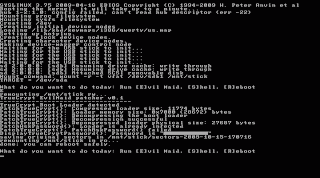
The current implementation of Evil Maid always stores the last passphrase entered, assuming this is the correct one, in case the user entered the passphrase incorrectly at earlier attempts.

NOTE: It’s probably illegal to use Evil Maid to obtain password from other people without their consent. You should always obtain permission from other people before testing Evil Maid against their laptops!

CAUTION: The provided USB image and source code should be considered proof-of-concept only. Use this code at your own risk, and never run it against a production system. Invisible Things Lab cannot be held responsible for any potential damages this code or its derivates might cause.

How the Evil Maid USB works
The provided implementation is extremely simple. It first reads the first 63 sectors of the primary disk (/dev/sda) and checks (looking at the first sector) if the code there looks like a valid TrueCrypt loader. If it does, the rest of the code is unpacked (using gzip) and hooked. Evil Maid hooks the TC’s function that asks user for the passphrase, so that the hook records whatever passphrase is provided to this function. We also take care about adjusting some fields in the MBR, like the boot loader size and its checksum. After the hooking is done, the loader is packed again and written back to the disk.

You can get the source code for the Evil Maid infector here.

Possible Workarounds
So, how should we protect against such Evil Maid attacks? There are a few approaches...

1. Protect your laptop when you leave it alone
Several months ago I had a discussion with one of the TrueCrypt developers about possible means of preventing the Evil Maid Attack, perhaps using TPM (see below). Our dialog went like this (reproduced here with permission from the TrueCrypt developer):

TrueCrypt Developer: We generally disregard "janitor" attacks since they inherently make the machine untrusted. We never consider the feasibility of hardware attacks; we simply have to assume the worst. After an attacker has "worked" with your hardware, you have to stop using it for sensitive data. It is impossible for TPM to prevent hardware attacks (for example, using hardware key loggers, which are readily available to average Joe users in computer shops, etc.)

Joanna Rutkowska: And how can you determine that the attacker have or have not "worked" with your hardware? Do you carry your laptop with you all the time?

TrueCrypt Developer: Given the scope of our product, how the user ensures physical security is not our problem. Anyway, to answer your question (as a side note), you could use e.g. a proper safety case with a proper lock (or, when you cannot have it with you, store it in a good strongbox).

Joanna Rutkowska: If I could arrange for a proper lock or an impenetrable strongbox, then why in the world should I need encryption?

TrueCrypt Developer: Your question was: "And how can you determine that the attacker has or has not worked with your hardware?" My answer was a good safety case or strongbox with a good lock. If you use it, then you will notice that the attacker has accessed your notebook inside (as the case or strongbox will be damaged and it cannot be replaced because you had the correct key with you). If the safety case or strongbox can be opened without getting damaged & unusable, then it's not a good safety case or strongbox. ;-)

That's a fair point, but this means that for the security of our data we must relay on the infeasibility to open our strongbox lock in a "clean" way, i.e. without visually damaging it. Plus it means we need to carry a good strongbox with us to any travel we go. I think we need a better solution...

Note that TrueCrypt authors do mention the possibility of physical attacks in the documentation:
If an attacker can physically access the computer hardware and you use it after the attacker has physically accessed it, then TrueCrypt may become unable to secure data on the computer. This is because the attacker may modify the hardware or attach a malicious hardware component to it (such as a hardware keystroke logger) that will capture the password or encryption key (e.g. when you mount a TrueCrypt volume) or otherwise compromise the security of the computer.
However, they do not explicitly warn users of a possibility of something as simple and cheap as the Evil Maid Attack. Sure, they write "or otherwise compromise the security of the computer", which does indeed cover e.g. the Evil Maid Attack, but my bet is that very few users would realize what it really means. The examples of physical attacks given in the documentation, e.g. modifying the hardware or attaching a malicious hardware, is something that most users would disregard as too expensive an attack to be afraid of. But note that our Evil Maid attack is an example of a “physical” attack, that doesn’t require any hardware modification and is extremely cheap.

Of course it is a valid point, that if we allow a possibility of a physical attack, then the attacker can e.g. install a hardware keylogger. But doing that is really not so easy as we discuss in the next paragraph. On the other hand, spending two minutes to boot the machine from an Evil Maid USB stick is just trivial and is very cheap (the price of the USB stick, plus the tip for the maid).

2. The Trusted Computing Approach
As explained a few months ago on this blog, a reasonably good solution against Evil Maid attack seems to be to take advantage of either static or dynamic root of trust offered by TPM. The first approach (SRTM) is what has been implemented in Vista Bitlocker. However Bitlocker doesn’t try to authenticate to the user (e.g. via displaying a custom picture shot by the user, with the picture decrypted using a key unsealed from a TPM), so it’s still possible to create a similar attack against Bitlocker, but with a bit different user experience. Namely the Evil Maid for Bitlocker would have to display a fake Bitlocker prompt (that could be identical to the real Bitlocker prompt), but after obtaining a correct password from the user Evil Maid would not be able to pass the execution to the real Bitlocker code, as the SRTM chain will be broken. Instead, Evil Maid would have to pretend that the password was wrong, uninstall itself, and then reboot the platform. Thus, a Bitlocker user that is confident that he or she entered the correct password, but the OS didn’t boot correctly, should destroy the laptop.

The dynamic root of trust approach (DRTM) is possible thanks to Intel TXT technology, but currently there is no full disk encryption software that would make use of it. One can try to implement it using Intel’s tboot and some Linux disk encryption, e.g. LUKS.

Please also note that even if we assume somebody “cracked” the TPM chip (e.g. using an electron microscope, or NSA backdoor), that doesn’t mean this person can automatically get access to the encrypted disk contents. This is not the case, as the TPM is used only for ensuring trusted boot. After cracking the TPM, the attacker would still have to mount an Evil Maid attack in order to obtain the passphrase or key. Without TPM this attack is always possible.

Are those trusted computing-based approaches 100% foolproof? Of course not. As signalized in the previous paragraph, if an attacker was able to mount a hardware-based keylogger into your laptop (which is non-trivial, but possible), then the attacker would be able to capture your passphrase regardless of the trusted boot. A user can prevent such an attack by using two-factor authentication (RSA challenge-response implemented in a USB token) or e.g. one-time passwords, so that there is no benefit for the attacker to capture the keystrokes. But the attacker might go to the extreme and e.g. replace the DRAM, or even the CPU with malicious DRAM or CPU that would sniff and store the decryption key for later access. We’re talking here about attack that very few entities can probably afford (think NSA), but nevertheless they are theoretically possible. (Note that an attack with inserting a malicious PCI device that would try to sniff the key using DMA can be prevented using TXT+VT-d technology).

However, just because the NSA can theoretically replace your CPU with a malicious one, doesn’t mean TPM-based solutions are useless. As for the great majority of other people that do not happen to be on the Terrorist Top 10, these represent a reasonable solution that could prevent Evil Maid attacks, and, when combined with a proper two-factor authentication, also simple hardware based attacks, e.g. keylogger, cameras, remote keystroke sniffing using laser, etc. I really cannot think of a more reasonable solution here.

3. The Poor Man’s Solution
Personally I would love to see TrueCrypt implementing TPM-based trusted boot for its loader, but, well, what can I do? Keep bothering TrueCrypt developers with Evil Maid attacks and hope they will eventually consider implementing TPM support...

So, in the meantime we have come up with a temporary poor man’s solution that we use at our lab. We call it Disk Hasher. It’s a bootable Linux-based USB stick that can be configured in quite a flexible way to calculate hashes of selected disk sectors and partitions. The correct hashes are stored also on the stick (of course everything is encrypted with a custom laptop-specific passphrase). We use this stick to verify the unencrypted portions of our laptops (typically the first 63 sectors of sda, and also the whole /boot partition in case of Linux-based laptops where we use LUKS/dm-crypt).

Of course there are many problems with such a solution. E.g. somebody who can get access to my Disk Hasher USB (e.g. when I’m in a swimming pool), can infect it in such a way that it would report correct hashes, even though the disk of my laptop would be “evilmaided”...

Another problem with Disk Hasher solution is that it only looks at the disk, but cannot validate e.g. the BIOS. So if the attacker found a way to bypass the BIOS reflashing protection on my laptop, then he or she can install a rootkit there that would sniff my passphrase or the decryption key (in case I used one time passwords).

Nevertheless, our Disk Hasher stick seems like a reasonable solution and we use it often internally at ITL to validate our laptops. In fact this is the most we can do, if we want to use TrueCrypt, PGP WDE, or LUKS/dm-crypt.

FAQ

Q: Is this Evil Maid Attack some l33t new h4ck?
Nope, the concept behind the Evil Maid Attack is neither new, nor l33t in any way.

Q: So, why did you write it?
Because we believe it demonstrates an important problem, and we would like more attention to be paid in the industry to solving it.

Q: I’m using two-factor authentication, am I protected against EM?
While a two-factor authentication or one time passwords are generally a good idea (e.g. they can prevent various keylogger attacks), they alone do not provide protection from Evil Maid-like attacks, because the attacker might modify his or her sniffer to look for the final decryption key (that would be calculated after the 2-factor authentication completes).

Q: How is Evil Maid different from Stoned-Bootkit?
The Stoned Bootkit, released a few months ago by an individual describing himself as “Software Dev. Guru in Vienna”, is also claimed to be capable of "bypassing TrueCrypt", which we take to mean a capability to sniff TC's passphrases or keys. Still, the biggest difference between Stoned Bootkit and Evil Maid USB is that in case of our attack you don’t need to start the victim's OS in order to install Evil Maid, all you need to do is to boot from a USB stick, wait about 1 minute for the minimal Linux to start, and then press ‘E’, wait some 2 more seconds, and you’re done. With the Stoned Bootkit, according to the author’s description, you need to get admin access to the target OS in order to install it, so you either need to know the Windows admin password first, or use some exploit to get the installer executing on the target OS. Alternatively, you can install it from a bootable Windows CD, but this, according to the author, works only against unencrypted volumes, so no use in case of TrueCrypt compromise.

Q: I've disabled boot from USB in BIOS and my BIOS is password protected, am I protected against EM?
No. Taking out your HDD, hooking it up to a USB enclosure case and later installing it back to your laptop increases the attack time by some 5-15 minutes at most. A maid has to carry her own laptop to do this though.

Q: What about using a HDD with built-in hardware-based encryption?
We haven’t tested such encryption systems, so we don’t know. There are many open questions here: how is the passphrase obtained from the user? Using software stored on the disk or in the BIOS? If on the disk, is this portion of disk made read-only? If so, does it mean it is non-updatable? Even if it is truly read-only, if the attacker can reflash the BIOS, then he or she can install a passphrase sniffer there in the BIOS. Of course that would make the attack non-trivial and much more expensive than the original Evil Maid USB we presented here.

Q: Which TrueCrypt versions are supported by the current Evil Maid USB?
We have tested our Evil Maid USB against TrueCrypt versions 6.0a - 6.2a (the latest version currently available). Of course, if the “shape” of the TrueCrypt loader changed dramatically in the future, then Evil Maid USB would require updating.

Q: Why did you choose TrueCrypt and not some other product?
Because we believe TrueCrypt is a great product, we use it often in our lab, and we would love to see it getting some better protection against such attacks.

Q: Why there is no TPM support in TrueCrypt?
The TrueCrypt Foundation published official generalized response to TPM-related feature requests here.

Acknowledgments
Thanks to the ennead@truecrypt.org for all the polemics we had which allowed me to better gather my thoughts on the topic. The same thanks to Alex and Rafal, for all the polemics I have had with them (it's customary for ITL to spend a lot of time finding bugs in each other's reasoning).

Wednesday, September 02, 2009

About Apple’s Security Foundations, Or Lack Of Thereof...

Every once in a while it’s healthy to reinstall your system... I know, I know, it’s almost a heresy to say that, but that’s reality in the world where our systems are totally unverifiable. In fact I don’t even attempt to verify if my Mac laptop has been compromised in any way (most system files are not signed anyway). But sometimes, you got this feeling that something might be wrong and you decide to reinstall to start your (digital) life all over again :)

So, every time I (re)install a Mac-based system, I end up cursing horribly at Apple’s architects. Why? Because in the Apple World they seem to totally ignore the concept of files integrity, to such extent that it’s virtually impossible to get any assurance that the programs I install are in any way authentic (i.e. not tampered by some 3rd party, e.g. by somebody controlling my Internet connection).

Take any Apple installer package, e.g. Thunderbird. In most cases an installer package on Mac is a .dmg file, that represents an installation disk image. Now, when you open such a file under Mac, the OS will never display any information about if this file is somehow signed (e.g. by who) or not. In fact, I’m pretty sure it’s never signed. What you end up with, is a .dmg file that you just downloaded over plaintext HTTP and you have absolutely no way of verifying if it is the original file the vendor really published. And you’re just about to grant admin privileges to the installer program that is inside this file -- after all it’s an installer, so must got root privileges, right (well, not quite maybe)? Beautiful...

Interestingly, this very same Thunderbird installer, but for Windows, is correctly signed, and Windows, correctly, displays that information (together with the ability to examine the certificate) and allows the user to make a choice of whether to allow it to run or not.


Sure, the certificate doesn’t guarantee that Mozilla didn’t put a nasty backdoor in there, nor that the file was not compromised due to Mozilla’s internal server compromise. Or that the certificate (the private key) wasn’t somehow stolen from Mozilla, or that the issuing authority didn’t make a mistake and maybe issued this certificate to some random guy, who just happened to be named Mozilla.

But the certificate provides liability. If it indeed turns out that this very Thunderbird installer was somehow malicious, I could take this signed file to the court and sue either Mozilla, or the certification authority for all the damages it might have done to me. Without the certificate I cannot do that, because I (and nobody) cannot know if the file was tampered while being downloaded (e.g. malicious ISP) or maybe because my system was already compromised.

But in case of Apple, we have no such choice -- we need to take the risk every time we download a program from the Internet. We must bet the security of our whole system, that at this very moment nobody is tampering with out (unsecured) HTTP connection, and also that nobody compromised the vendor’s Web Server, and, of course, we hope that the vendor didn’t put any malicious code into its product (as we could not sue them for it).

So that sucks. That sucks terribly! Without ability to check the integrity of programs we want to install, we cannot build any solid foundations. It’s funny how people divagate whether Apple implemented ASLR correctly in Snow Leopard, or not? Or whether NX is bypassable. It’s meaningless to dive into such advanced topics, if we cannot even assure that at the day 0 our system is clean. We need to start building our systems from the ground up, and not starting from the roof! Ability to assure the software we install is not tampered seems like a reasonable very first step. (Sure it could be compromised 5 minutes later, and to protect against this we should have other mechanisms, like e.g. mentioned above ASLR and NX).

And Apple should not blame the vendors for such a situation (“Vendors would never pay $300 for a certificate”, blah, blah), as it is just enough to have a look at the Windows versions of the same products, and that most of them do have signed installers (gee, even open-source TrueCrypt, has a signed installer for Windows!).

One should say that a few vendors, seeing this problem on Mac, do publish PGP signatures for their installation files. This includes e.g. PGP Desktop for Mac, KeePassX, TrueCrypt for Mac, and a few others. But these are just exceptions and I wonder how many users will be disciplined (and savvy) enough to correctly verify those PGP signatures (in general it requires you to download the vendor keys many months before, keep it in your ring, to minimize possibility that somebody alters both the installer files and the keys you download). Some other vendors offer pseudo-integrity by displaying MD5/SHA1 sums on their websites. That would make some sense only if the website on which the hashes are displayed was itself SSL-protected (still the file signature is a better option), as otherwise we can be sure that the attacker that is tampering with the installer file, will also take care about adjusting the hash on the website... But of course this never is the case -- have a look e.g. at the VMWare download page for the Mac Fusion (one need to register first). Very smart, VMWare! (Needles to say, the VMWare Workstation installer for Windows is properly signed).

BTW, anybody checked if the Apple updates are digitally signed somehow?

All I wrote here in this post is just trivial. It should be just obvious for every decently educated software engineer. Believe me it’s really is much more fun for me to write about things like new attacks on chipsets or virtualization. But I have this little hope that maybe somebody at Apple will read this little post and fix their OS. Because I really like Apple products for their aesthetics...

Wednesday, August 26, 2009

PDF signing and beyond

Today I got an advertising email from GlobalSign (where I previously bought a code signing certificate for Vista kernel drivers some years ago) highlighting their new (?) type of certificates for signing of Adobe PDF files. It made me curious, because, frankly, I've been recently more and more missing this feature. After a quick online research it turned out that this whole Adobe Certified Documents Services (CDS) seem to be nothing new, as apparently even Adobe Reader 6.0 had support for verifying those CDS certificates. The certificates are also available from other popular certification authorities like e.g. Entrust and Verisign, and a couple of others.

So, I immediately felt stupid that I haven't been aware of such a great feature, which apparently is out there for a few years now. Why I thought it was so great a feature? Consider the following scenario…

At our Invisible Things Lab resources page we offer a handful of files to download — slides and some proof of concept code. The website is served over a plaintext HTTP. This means that if you're downloading anything over a public WiFi (hotel, airport lounge, etc) you never know if the PDF you actually get has not been infected somewhere in the middle, e.g. by a guy in the lobby that is messing with the hotel WiFi.

So, one might argue that I should have paid a few hundred bucks and get an SSL certificate for my website and start serving it over HTTPS. But here's the problem — I, as zillions of other small businesses and individuals, host my website on some 5-dollar-a-month one-of-the-thousands hosting provider. I have zero knowledge about what people work there and if they can be trusted, and I also know nothing (and have zero impact) on how secure (or not, for that matter) the server is. (Same applies to my cell phone carrier, ISP, etc, BTW).

Now, the SSL certificate for the website "knows" nothing about how the files on my website should look like, in particular if they are compromised or not. All the SSL certificate does is to give assurance to the remote client that he or she downloaded the actual files that were on the server in the moment of downloading — whether they were the original ones authored by me, or perhaps maliciously modified by somebody who got access to the server.

So, the solution with an SSL certificate would work only if I trusted my web server, which could be assumed only if I run my own dedicated server. That, however, would be an overkill for a small company like ITL, especially that our business is not based on our web presence — in fact the website is maintained mainly for other researchers and students, who can easily download our papers and code from there, and also for the reporters so they can e.g. download a press release from there.

Surprisingly, the website has never been compromised, probably because it doesn't present an interesting target for any skilled person (or maybe exceptionally skilled people work at the hosting provider?). But I cannot know for sure, as I don't constantly monitor all the hashes of all the files, as this would require… well a dedicated server that would be running an SHA1 calculating script in a loop for 24/7 :)

Of course, zillions of other websites works this very same way and present the very same problems.

Now, ability to sign PDFs would be just a great solution here, because I could sign all those files with my certificate, and then all the people downloading stuff from ITL could know they are getting original PDFs that were created on one of the ITL members desktop computers, no matter how compromised the web server or the network connection is.

For the same reasons, I would welcome if others started doing the same, as currently I simply must assume every PDF I download from the net (and PDFs account for the majority of file downloads I do) to be potentially malicious. So, I always open them in my Red or Yellow VM (depending on the source of the download), and only if it "looks good" (very fuzzy term, I know), I might decide to move it to my host desktop (it's easier to work with PDFs on your host, and actually you should use your host desktop for something).

(Yes, I know, Kostya Kortchinsky, or Rafal, can sometimes escape from VMWare, but still I believe that today the best isolation I can get on a desktop, without sacrificing much convince, is via a type II hypervisor. It's horribly inelegant, but well, that's life).

So, I read some more about this Adobe CDS, being all excited about it, and ready to spend a few hundred euros on a certificate, only to realize that it doesn't look as good as I thought.

First disappointment comes from the fact that you must create a PDF using Adobe Acrobat software (not the Reader, but the commercial one). I've created all my PDFs using either Office (in the past) or iWork (today), and none of them seem to offer a way to digitally sign the PDF. I would like to get a simple tool, say pdfsign.exe, that I could use to sign any PDF I have, no matter how I generated it. Also, not surprisingly, the Mac native PDF viewer (Preview) doesn't seem to recognize the digital signature, and I bet some Linux PDF viewers do not as well.

Worst of all, even the Acrobat Reader 9, that I tested under Windows, and that correctly displayed all the CDS information, does one unbelievably stupid thing — it parses and renders the whole PDF before displaying the signature info. So, if you downloaded a malicious PDF, Acrobat Reader will happily open it and parse, without asking you a question of whether you would like to open it (as it is perhaps unsigned). At least I was unable to find an option that would force it to do that. So, if this PDF contained an exploit for the reader, it surely would get executed. Compare this with the (correct) behavior of Vista UAC where it presents the executable signature details before executing it.

You can see how your software works with Adobe PDF signatures, e.g. by looking at this exemplary file signed by GlobalSign.

So, Adobe CDS, in the form they are today, seem to be pretty useless, as far as protection from potentially malicious PDFs is considered (they surely have other positive applications, e.g. to certify about authenticity of e.g. a diploma).

But wouldn't it be great to have such a file signing mechanism globally adopted and not only for PDFs, but for any sort of files, including ZIPs, tgz's, heck, even plain text files? And have our main OSes generically recognize those signatures and display unified prompts of whether we want to allow an application to to open the file or not? Perhaps, in some situations, we could even define policies for specific applications. This seems easy to do from the technical point of view — we just need to "hook" (oh, God, did I say "hook"?) high-level OS API's like e.g. open() or CreateFile().

What about PGP and possibility of using this for signing any sort of files? Well, we use PGP a lot at ITL, but mainly for securing peer-to-peer communication (e.g. between us and our clients). There really is no good way to publish one's PGP key — the concept of Web of Trust might be good for some closed groups of people, but not for publishing files "to the world". And, of course, the first thing that an attacker who subverted PDFs on our website will do is to also subvert the PGP key displayed on the website. I also tried once to publish a PGP key to a key server, but got discouraged immediately after I noticed it didn't use SSL for submission. BTW, anybody knows if the key servers today use SSL? If not, how the trust is established? Maybe email clients, e.g. Thunderbird, come with built in PGP keys for select key servers?

So, I guess that was the main point of writing this post — to express how madly I would welcome a generic, OS-based, non-obligatory, signature verification for files, based on PKI :)

Ah, before a dozen of people jumps to the comment box to tell me that digital signatures do not assure non-maliciousness of anything — please don't do that, because I actually know that. In fact, it is not possible to assure non-maliciousness of pretty much anything, especially without strictly defining an ethical system we would like to use first. What the signatures provide is the liability, so that I know who to sue, in case my naked holiday pictures got leaked to the public because of some malicious PDF exploiting my system. In that case I can sue either the actual person who signed the PDF (if this person is identifiable) or the certification authority who issued the certificate to a wrong (unidentifiable) person.

Friday, March 20, 2009

The Sky Is Falling?

A few reporters asked me if our recent paper on SMM attacking via CPU cache poisoning means the sky is really falling now?

Interestingly, not many people seem to have noticed that this is the 3rd attack against SMM our team has found in the last 10 months. OMG :o

But anyway, does the fact we can easily compromise the SMM today, and write SMM-based malware, does that mean the sky is falling for the average computer user?

No! The sky has actually fallen many years ago… Default users with admin privileges, monolithic kernels everywhere, most software unsigned and downloadable over plaintext HTTP — these are the main reasons we cannot trust our systems today. And those pathetic attempts to fix it, e.g. via restricting admin users on Vista, but still requiring full admin rights to install any piece of stupid software. Or selling people illusion of security via A/V programs, that cannot even protect themselves properly…

It's also funny how so many people focus on solving the security problems by "Security by Correctness" or "Security by Obscurity" approaches — patches, patches, NX and ASLR — all good, but it is not gonna work as an ultimate protection (if it could, it would worked out already).

On the other hand, there are some emerging technologies out there that could allow us to implement effective "Security by Isolation" approach. Such technologies as VT-x/AMD-V, VT-d/IOMMU or Intel TXT and TPM.

So we, at ITL, focus on analyzing those new technologies, even though almost nobody uses them today. Because those technologies could actually make the difference. Unlike A/V programs or Patch Tuesdays, those technologies can change the level of sophistication required for the attacker dramatically.

The attacks we focus on are important for those new technologies — e.g. today Intel TXT is pretty much useless without protection from SMM attacks. And currently there is no such protection, which sucks. SMM rootkits sound sexy, but, frankly, the bad guys are doing just fine using traditional kernel mode malware (due to the fact that A/V is not effective). Of course, SMM rootkits are just yet another annoyance for the traditional A/V programs, which is good, but they might not be the most important consequence of SMM attacks.

So, should the average Joe Dow care about our SMM attacks? Absolutely not!

Sunday, September 07, 2008

Microsoft executive "rebuts" our research!

Ah, there is no feeling like seeing your name in the news when drinking your morning coffee... In this piece some Steve Riley, a senior security strategist at Microsoft, decided to "rebute" our recent Black Hat presentations research results.

Mr. Riley had been quoted by ZDnet as saying:

"Her [Joanna Rutkowska] insistence is that you can replace the hypervisor without anybody knowing... Our assertion is that this is incorrect," Riley told the audience. "First of all, to do these attacks you need to become administrator at the root. So that's going to be, on an appropriately configured machine, an exceedingly difficult thing to happen."

Apparently, Mr. Riley has never seen our Black Hat presentations (or slides at least) that he is referring to (oh, wait, that is the typical case with all our "refuters", how come?)...

First, we never said anything about replacing the hypervisor. I really have no idea how this idea was born in Mr. Riley's head? Replacing the hypervisor - that would indeed be insane for us to do!

Second, it is not true that the attacker needs to become an administrator "at the root" (he mean the root partition or administrative domain here I assume). The attack we presented in our second speech, that exploited a heap overflow in the Xen hypervisor FLASK module, could have been conducted from the unprivileged domain, as we demonstrated during the presentation.

Mr. Riley continues with his vision:

"Because you [the attacker] didn't subject your own replacement hypervisor through the thorough design review that ours did, I'll bet your hypervisor is probably not going to implement 100 percent of the functionality as the original one," Riley said. "There will be a gap or two and we will be able to detect that."

Well, if he only took the effort of looking into our slides, he would realize that, in case of XenBluePill, we were slipping it beneath (not replacing!) the original hypervisor, and then run the original one as nested. So, all the functionality of the original hypervisor was preserved.

Mr. Riley also shares some other ground breaking thoughts in this article, but I think we can leave them uncommented ;)

This situation is pretty funny actually - we have here the words and feelings of some Microsoft executive vs. our three technical presentations, all the code that we released for those presentations, and also a few of our demos. Yet, it's apparently still worth getting into the news and reporting what the feeling of Mr. Riley are...

Let me, however, write one more time, that I'm (still) not a Microsoft hater. There are many people at Microsoft that I respect: Brandon Baker, Neil Clift, the LSD guys, Mark Russinovich, and probably a few more that I just haven't had occasion to meet in person or maybe forgot about at the moment. It's thus even more sad that people like Mr. Riley are also associated with Microsoft, even more they are the face of Microsoft for the majority of people. Throwing a party in Vegas and Amsterdam once a year certainly is not enough to change the Microsoft's image in this case...

Interestingly, if Mr. Riley only attended our Xen 0wning Trilogy at Black Hat, then he would notice that we were actually very positive about Hyper-V. Of course, I pointed out that Xen 3.3 certainly has a more secure architecture right now, but I also said that I knew (from talking to some MS engineers from the virtualization group) that Hyper-V is going to implement similar features in the next version(s) and that this is very good. I also prized the fact it has only about 100k LOC (vs. about 300k LOC in Xen 3.3).

So, Mr. Senior Security Strategist, I suggest you do your homework more carefully next time before throwing mud at others and trying to negate the value of their work (and all the efforts of Microsoft's PR people).

On a separate note, I found it quite unprofessional that ZDNet's Liam Tung and Tom Espiner, the authors of the news, didn't ask me for a commentary before publishing this. Not to mention that they also misspelled Rafal's name and forgot to mention about Alex, the third co-author of the presentations.